0 → 1: designing the compensation platform 100+ companies bet their pay strategy on
Rewardly didn't exist yet – no product, no interface, just a raw dataset from ~100 companies and a bet that HR teams across Southeast Europe would pay for real-time compensation benchmarking instead of stale surveys and spreadsheets. I joined as the sole designer to take it from zero to a fully functional platform.
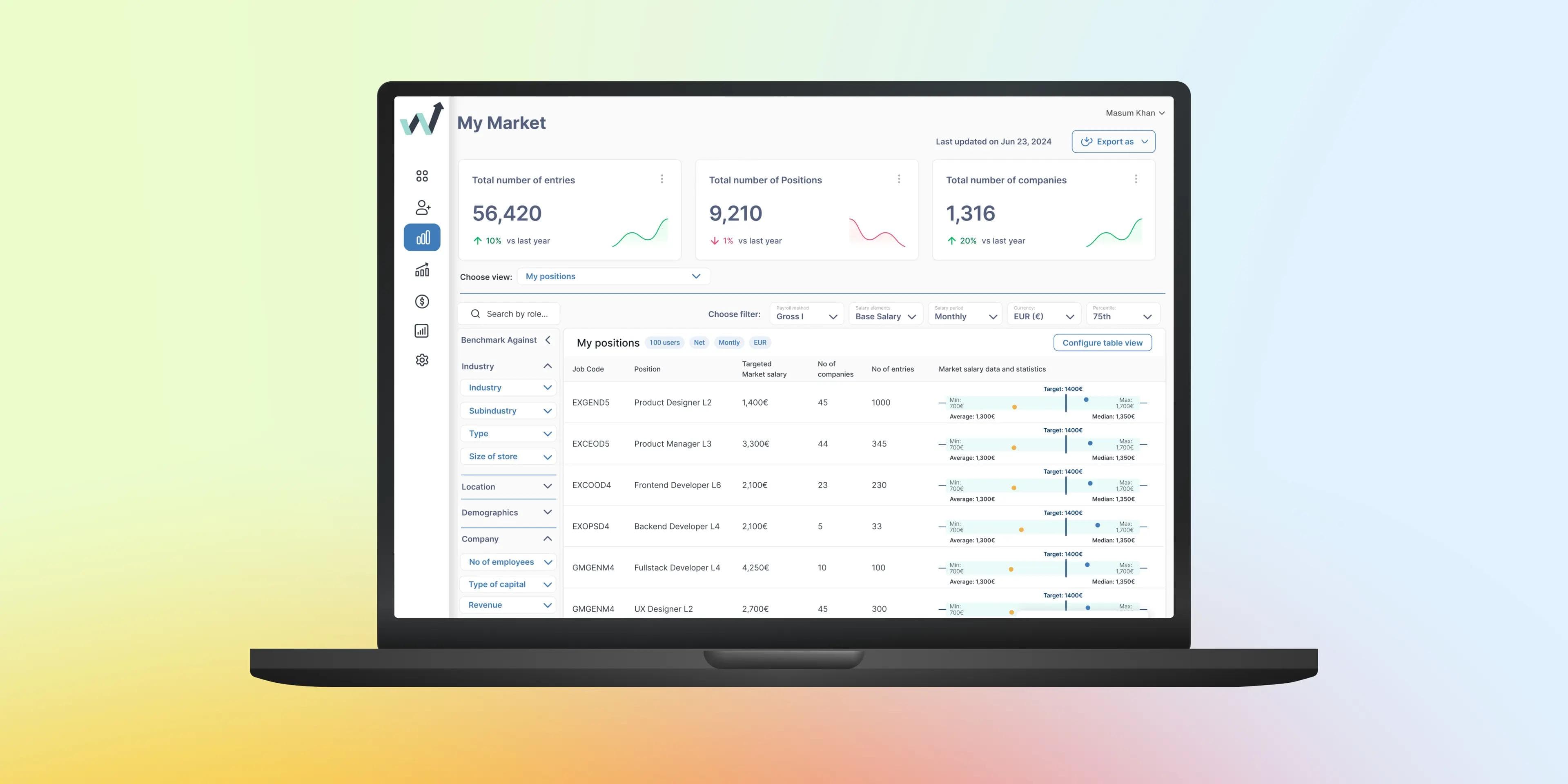
My Role
As Lead UX/UI Designer (sole designer on the project), I owned everything from discovery research and information architecture through interaction design, visual design, design system creation, and usability testing. I worked directly with the founder, 2 full-stack developers, and a PM. The initial build spanned approximately 8 months from first research sessions to launch.
The Problem
HR teams across Southeast Europe are making critical pay decisions based on outdated data buried in dozens of disconnected Excel files
Compensation benchmarking – comparing your company's salaries, bonuses, and benefits against the market – is essential for attracting and retaining talent. But for most HR teams in the region, this process means downloading spreadsheets from multiple sources, manually cross-referencing rows, building pivot tables, and hoping the data is still current by the time a decision is made.
The result? Slow decisions, inaccurate benchmarks, pay gaps that go unnoticed, and stakeholders who don't trust the numbers they're being shown.
Background
The spreadsheet problem nobody talks about
Imagine this: It's Thursday afternoon. Ana, an HR manager at a mid-size tech company in Belgrade, needs to present a salary adjustment proposal to her CEO on Monday. She has compensation data from a survey she purchased six months ago, three Excel files from a consulting firm, her own internal payroll export, and a PDF report from last year's benchmarking study.
She spends the rest of Thursday and all of Friday merging these files, fixing broken formulas, and rebuilding pivot tables. By Sunday night, she has a slide deck – but she's not confident the numbers are right, because the data sources don't align, and some of it is already a year old.
“60–70% of benchmarking time is spent on data wrangling – merging files, fixing formats, matching job titles – rather than actual strategic analysis.”
Based on user research interview
This is the reality for thousands of HR professionals across Southeast Europe. The compensation data exists, but it's fragmented across formats, sources, and timelines – making the simple question “Are we paying competitively?” unreasonably difficult to answer.
Rewardly was built to make that question answerable in minutes, not days.
Research
Understanding the pain before designing the solution
The data team had collected salary, benefits, and compensation structure data from around 100 participating companies across Serbia. It lived in spreadsheets and backend tables. This was both terrifying and liberating. Terrifying because there were no guardrails, no legacy design to reference. Liberating because every decision was mine to shape.
When I joined, the “product” was essentially a database. No user-facing interface, no defined user journey, no visual language – nothing.
My first job wasn't designing screens. It was understanding who would actually use this thing and what they needed it to do. I conducted 14 interviews with HR managers, compensation analysts, and executives across industries before drawing a single wireframe. Three patterns shaped every design decision:
Nobody trusts the data they have. HR managers referenced multiple salary surveys and averaged them — guesswork with extra steps. Trust had to be designed into every layer of the interface.
Benchmarking is a luxury. Companies that did it well had dedicated headcount and expensive tools. Smaller firms (under 200 employees) were flying blind. The product had to be radically simpler than enterprise solutions like Mercer or Radford.
The output is always a dead PDF. Leadership wanted dashboards, not static reports.
Rewardly had to be a living decision-making tool, not a data repository.
“I spend more time preparing the data than analyzing it.”
HR teams reported spending 60–70% of their benchmarking time on data wrangling — merging files, fixing formats, matching job titles across different classification systems. The actual strategic analysis was an afterthought.
“I can’t answer follow-up questions in the room.”
When presenting compensation recommendations to leadership, HR managers frequently couldn’t drill into specifics. ‘What about this role specifically?’ required going back to the spreadsheets and rebuilding views.
“I don’t trust the data, and neither do my stakeholders.”
Outdated data, inconsistent sources, and opaque methodology eroded confidence. Stakeholders questioned the numbers, delaying decisions and creating friction between HR and leadership.
Define
Anchoring design in the core user need
From research, I distilled the problem into a single design challenge and a primary persona.
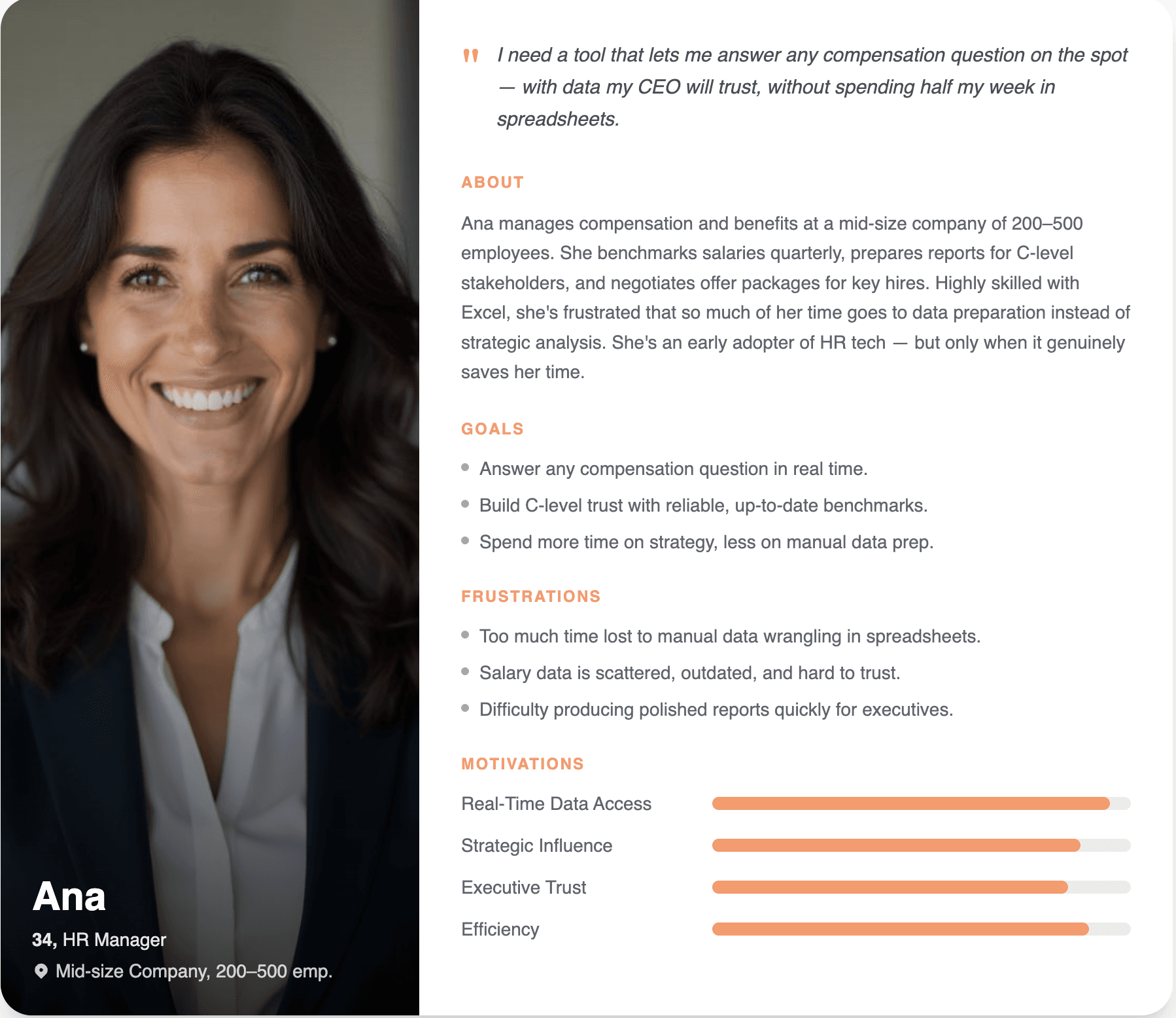
How might we…
Consolidate fragmented compensation data from dozens of Excel sources into a single, real-time platform that lets HR teams benchmark, analyze, and present with confidence?
Ideation
From spreadsheet workflows to platform thinking
The core design insight: Rewardly doesn't just need to display data differently – it needs to eliminate the entire workflow that currently surrounds compensation benchmarking.
What HR teams do in Excel
What Rewardly replaces it with
Workflow
Research & discovery
Competitive analysis, HR workflow mapping, stakeholder interviews
Wireframes & IA
Structuring how dozens of data dimensions surface in a scannable UI
UI/UX design
High-fidelity screens for Company, Markets, filters, and reports
Testing & iteration
Usability testing with HR professionals, data-driven iterations
Deep Dive
Designing for data density without cognitive overload
Compensation isn't one task — it's three mental models: “Where do we stand?” (benchmarking), “What does the market look like?” (exploration), and “Where are the gaps?” (action). Every HR professional I spoke to thought in this sequence, yet every tool I audited collapsed all three into a single table.
This became the product's backbone: My Company, My Market, and My Positions — three modules, each its own coherent experience, connected through shared filters and consistent interaction patterns. This architecture wasn't in any product brief. It came directly from the research.
Building my company: the central hub
My Company had to turn a dense dataset – hundreds of roles, 6+ columns each – into something an HR manager could scan in under a minute. I designed configurable tables with inline salary gap indicators (color-coded with exact euro differences), filters structured around how HR people actually think (role, seniority, location – not job coded), and a dual-view toggle that let users switch between market benchmarks and their own org structure. That toggle solved the number-one complaint from research: benchmark tools never match how companies actually organize roles.
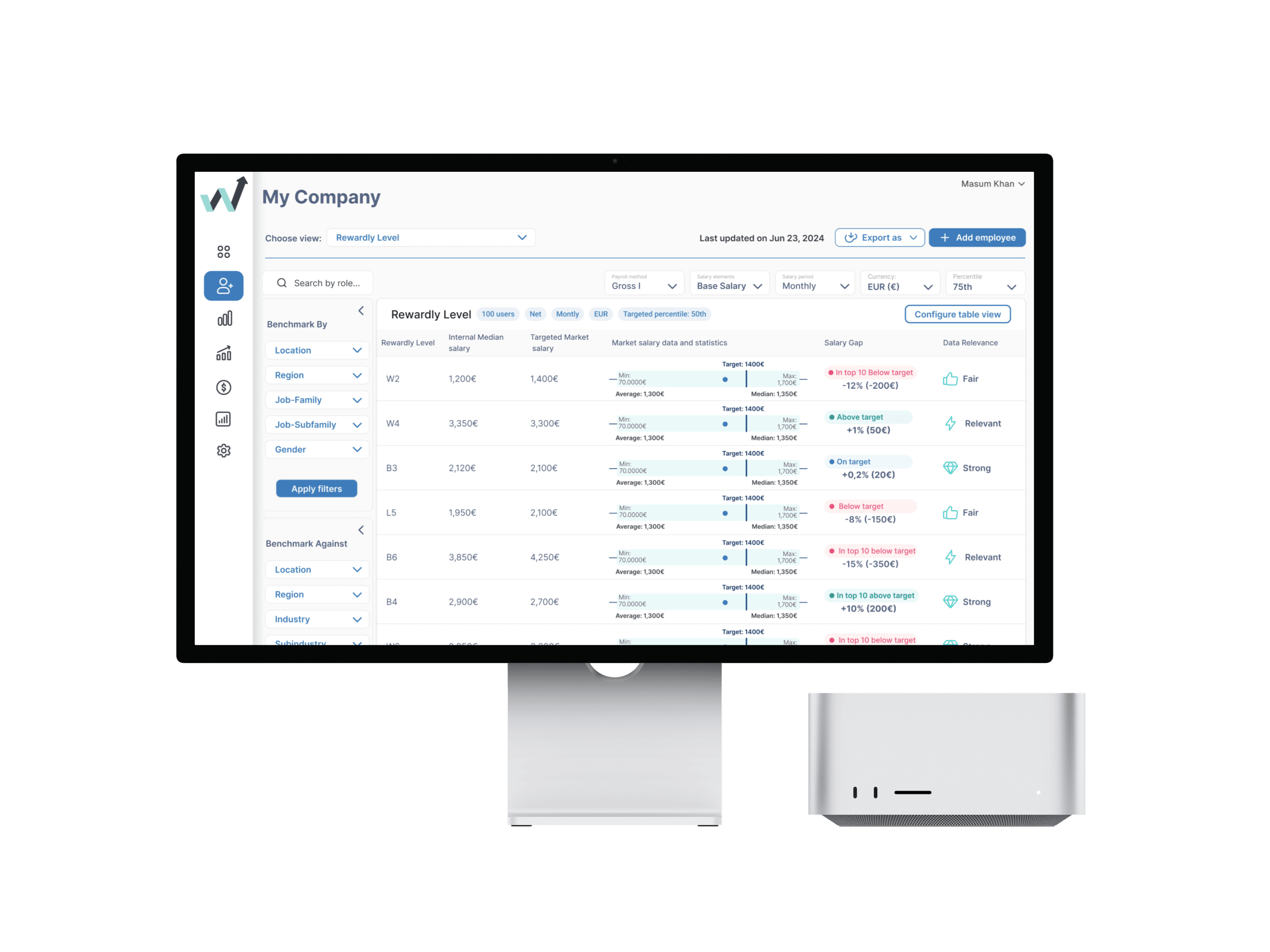
Building my market: from 100 companies to a living dataset
Where “My Company” was task-driven, “My Market” was exploratory – designed to help HR leaders understand regional compensation trends. With a small initial dataset, I prioritized honesty over density: distribution charts with visible sample sizes instead of misleading averages, growth metrics in the dashboard header as a trust signal (“this data is alive and growing”), and a key research-driven decision – dedicated benefits and practices views. In the Balkan market, benefits like private medical, pension contributions, and overtime policies matter as much as base salary, yet no competitor visualized them. I designed filterable comparison modules that benchmarked entire benefits packages against industry norms.
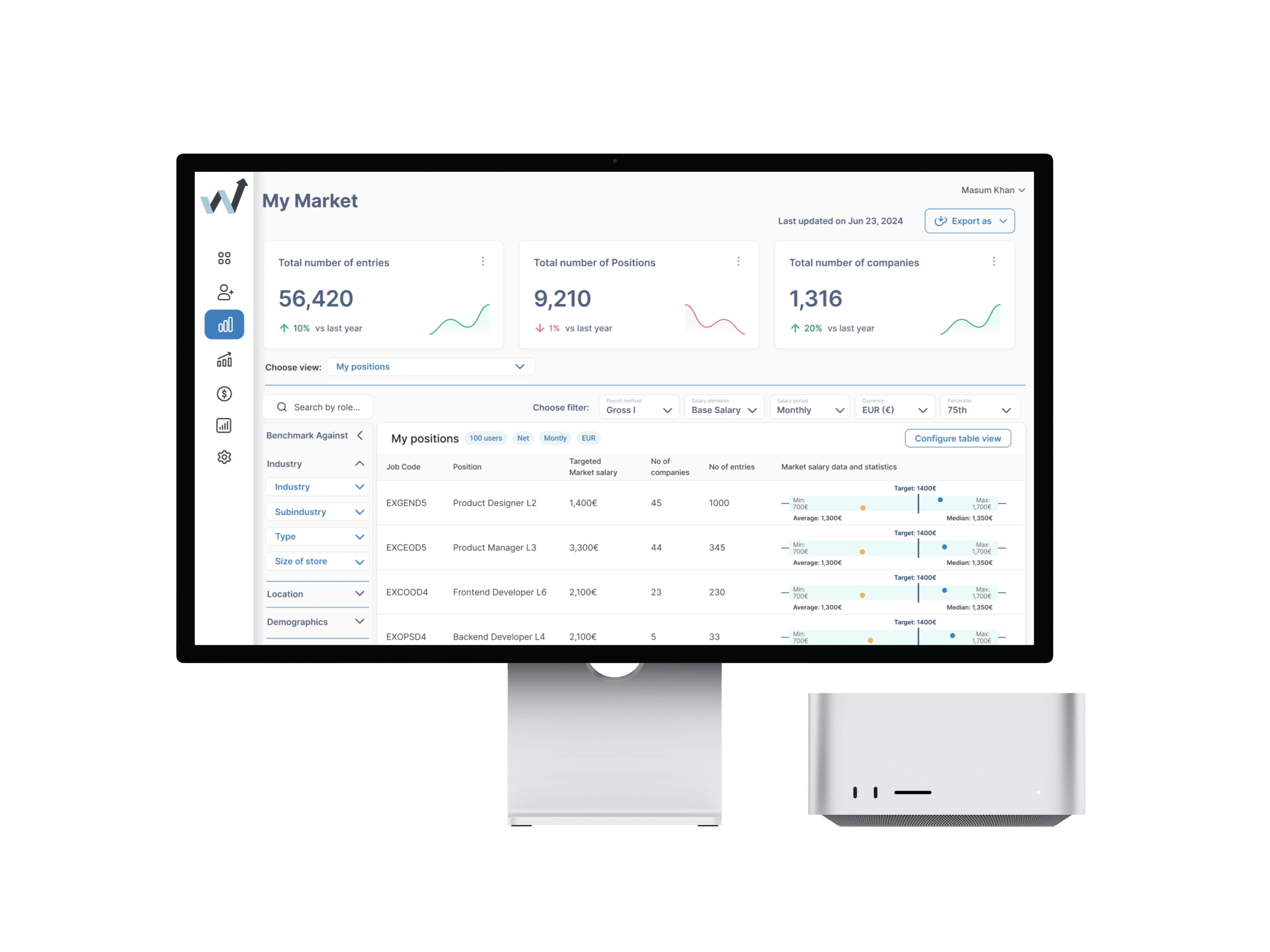
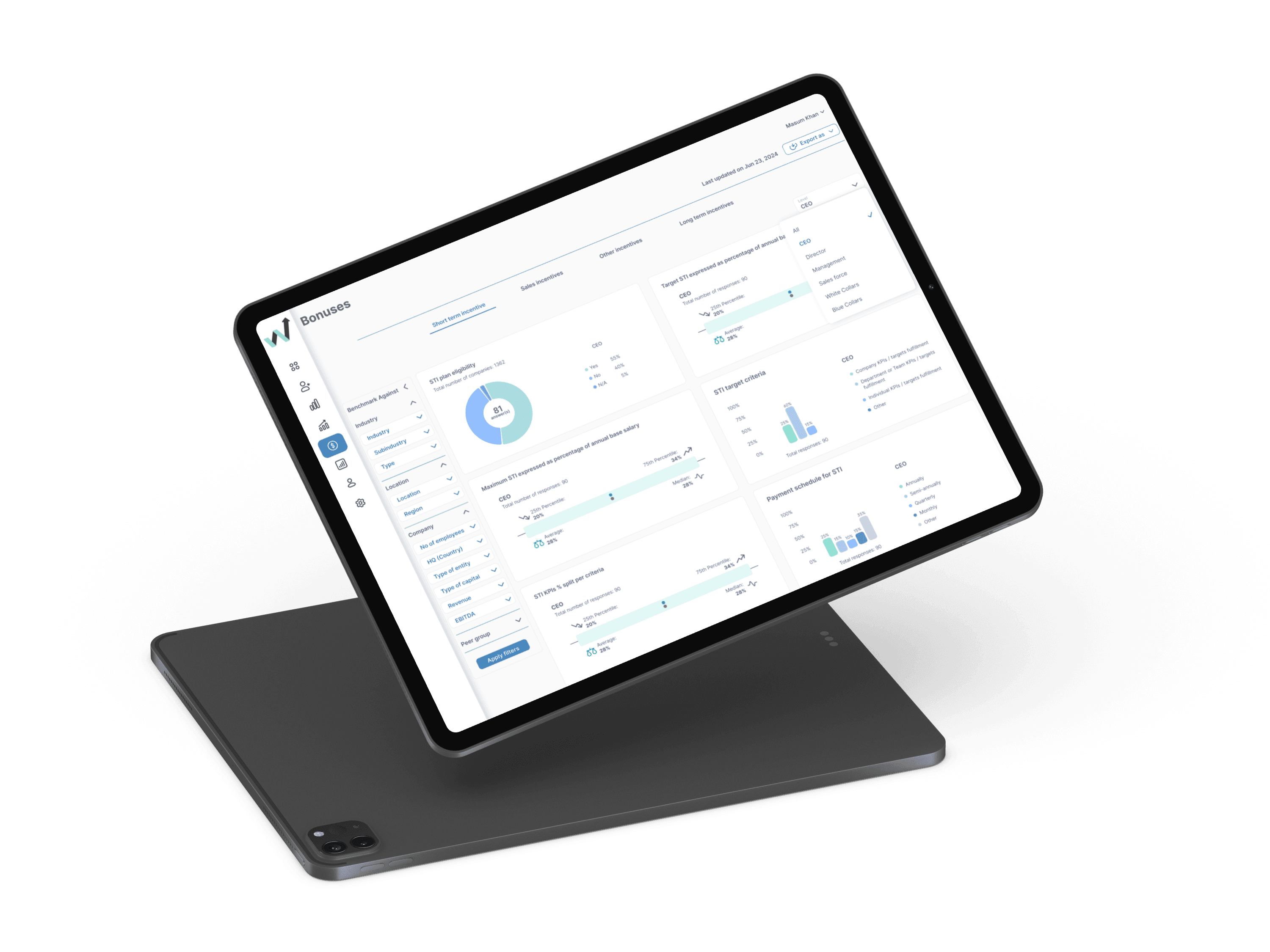
Bonuses and benefits charts
For exported reports and stakeholder-facing views, data cards condense complex benchmarking results into digestible, visual summaries. Every visualization answers one specific question — no decorative charts.
Design Decisions I Fought For
Where I pushed back – and why it mattered
Real-time freshness indicators
The engineering team initially proposed weekly data refreshes. I pushed hard for visible “Last updated on [date]” timestamps on every data point and every screen. My research showed that trust in compensation data is directly proportional to perceived freshness — HR managers discount data they suspect is even slightly outdated. We compromised on daily refreshes with clear staleness indicators.
Configurable table views
The product team initially wanted a fixed, “opinionated” table layout. I advocated for the “Configure table view” button after watching users in early testing sessions immediately try to rearrange columns and toggle visibility on specific data points. The assumption that “simple = less control” was wrong. HR analysts are power users. They don’t want simplicity — they want clarity. Those are different things.
Salary gap as a first-class visual element
The original product spec treated gap analysis as a secondary feature, something generated in exported reports. I elevated it to a persistent, color-coded column visible on every table view. “Below target: -12% (-200€)” rendered in red is worth more than a ten-page compensation report.
Designing for today’s dataset and tomorrow’s
When you’re building from scratch, there’s a constant tension between designing for where you are and where you want to be. I intentionally designed data visualizations that would look credible with a few dozen data points but scale gracefully to thousands. Distributions that show sample sizes honestly. Filters that work whether you have 5 matching companies or 500. Empty states that provide context rather than showing embarrassingly sparse charts.
Results
The biggest UX opportunity in B2B data products is eliminating the workflow around the data, not just improving the dashboard
less than
3 min
to benchmark a role (vs. 45+ min in Excel)
4.5/5
average satisfaction score across all tested flows
100%
exported stakeholder reports without guidance
“This is exactly what I've been building manually in spreadsheets for years. Seeing it all in one place, live, with the gaps already calculated – I don't know how I'd go back.”
Usability Test Participant, HR Manager
The platform launched in the Serbian market and is expanding to Bulgaria, Bosnia & Herzegovina, and Croatia in Q3 2025.
Final Thoughts
The most impactful design work often isn't about inventing new interactions – it's about eliminating unnecessary ones.
What I Learned: The real design problem wasn't the UI – it was the workflow. HR professionals didn't need a prettier spreadsheet. They needed to stop using spreadsheets entirely. This shifted my approach from “How do we display this data?” to “How do we eliminate every step between the question and the answer?”
Next Steps: AI-powered salary recommendations based on market positioning goals, predictive analytics flagging roles becoming uncompetitive, and HRIS integrations (BambooHR, Personio) to auto-sync company data instead of requiring manual uploads.
What I'm Most Proud Of: Designing a product that solves a workflow problem, not just a visual one. Rewardly's most important design decision was making the platform do the work users were doing manually – so they could focus on the strategic decisions they were actually hired to make.